RubyでYahooファイナンスをスクレイピング
Nokogiriを使ったら簡単にできた。
# coding: utf-8
require 'nokogiri'
require 'open-uri'

def get_content(html, tag, className, index, childPath=nil)
    html.search("//#{tag}[@class='#{className}']#{childPath}")[index].content
end

class StockInfo
    def initialize(stockCode)
        @stockCode = stockCode
        scrape
    end
    attr_reader :stockCode, :price, :openingPrice, :highPrice, :lowPrice, :closingPrice, :volume

    private
    def scrape_stock_info(html, index)
        get_content(html, "dd", "ymuiEditLink mar0", index, "/strong").delete(",")
    end

    def scrape
        begin
            page = open("http://stocks.finance.yahoo.co.jp/stocks/detail/?code=#{@stockCode}")
        rescue OpenURI::HTTPError
            return
        end
        html = Nokogiri::HTML(page.read, nil, 'utf-8')

        @price = get_content(html, "td", "stoksPrice", 0).delete(",")
        @openingPrice = scrape_stock_info(html, 0)
        @highPrice = scrape_stock_info(html, 1)
        @lowPrice = scrape_stock_info(html, 2)
        @closingPrice = scrape_stock_info(html, 3)
        @volume = scrape_stock_info(html, 4)
    end
end

info = StockInfo.new("1413")
puts info.price
puts info.openingPrice
puts info.highPrice
puts info.lowPrice
puts info.closingPrice
puts info.volume
RubyMotionを使ってみた
RubyでiOSのネイティブアプリ開発ができるRubyMotion、Githubリポジトリにサンプルコードがあったのでざっと眺めていたのですが、iPad用のサンプルが無いのと、描画にUIBezierPathを使っていたので、試しに、
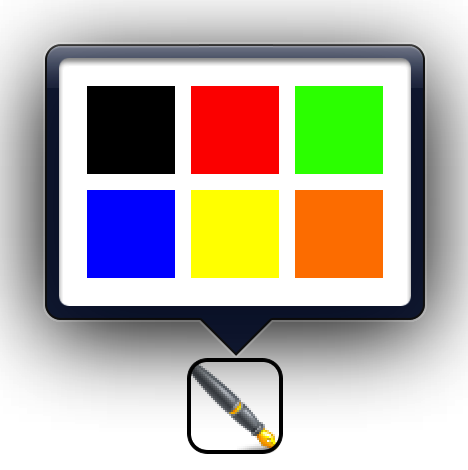
- UIPopoverControllerで色選択のパレットを表示
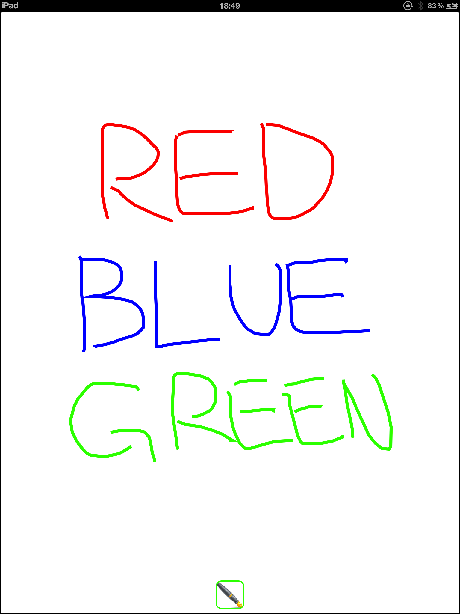
- CoreGraphicsで線を描画
するアプリを作ってみました。
パレット
適当に書いてみる
iPad用アプリの設定
Motion::Project::App.setup do |app|
  # Use `rake config' to see complete project settings.
  app.name = 'DrawLine'
  app.device_family = :ipad # ←この行を追加
end
のようにします。
感想
動作確認環境
コード
https://github.com/yolatengo8888/RubyMotionTest
Last.fmのAPIを使ってみた(2) イベント一覧表示とTwitter投稿機能を追加
前回作成したアプリに、イベント一覧表示とTwitter投稿の機能を追加しました。
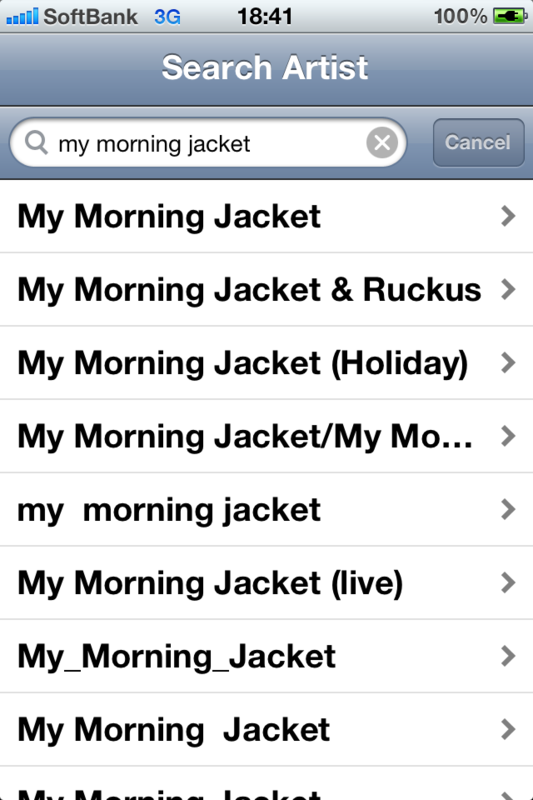
- Last.fmのAPIを使ってアーティスト名を検索する
- 検索結果をテーブルビューに表示する
- テーブルビューのセルをタップすると、別画面に遷移してLast.fmから取得したイベント一覧を表示する
- イベント一覧をタップするとTwitter投稿画面が表示され、iOSで設定されているアカウントに投稿できる
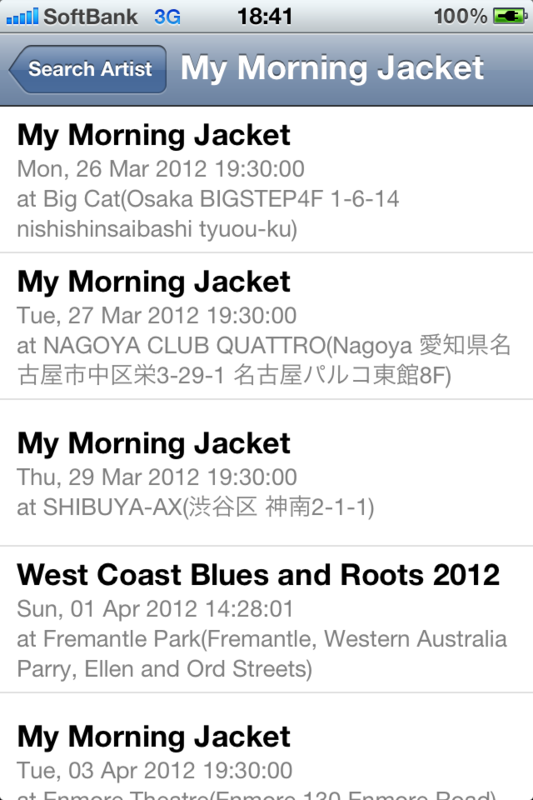
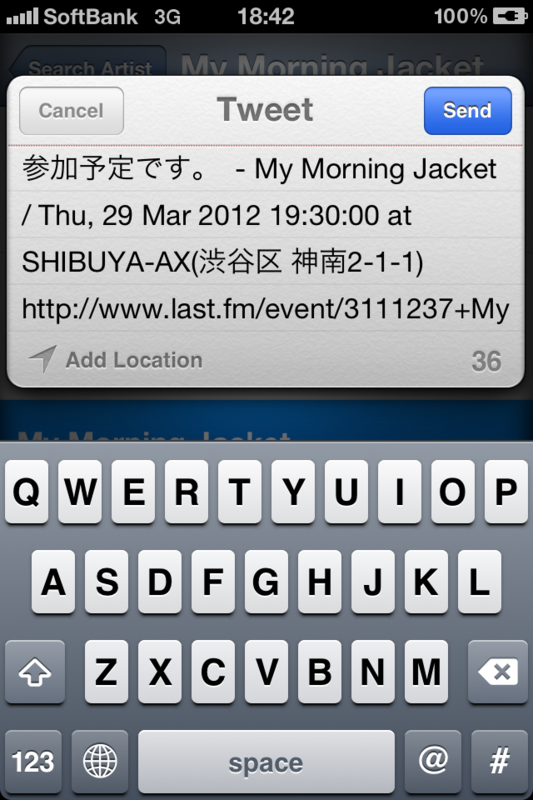
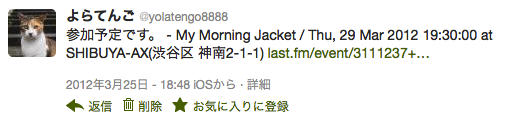
Twitterの投稿結果。
コード
https://github.com/yolatengo8888/LastFmTest
動作確認環境
※iOS5のAPIを使っているため、iOS5以上でないと動きません。
Last.fmのAPIを使ってみた(1) アーティスト名を検索して結果をiOSのUITableViewに表示する
Last.fmのAPIが何気に充実していたので何か作ってみたいと思ったのと、iPhoneアプリの作り方を勉強したかったので、
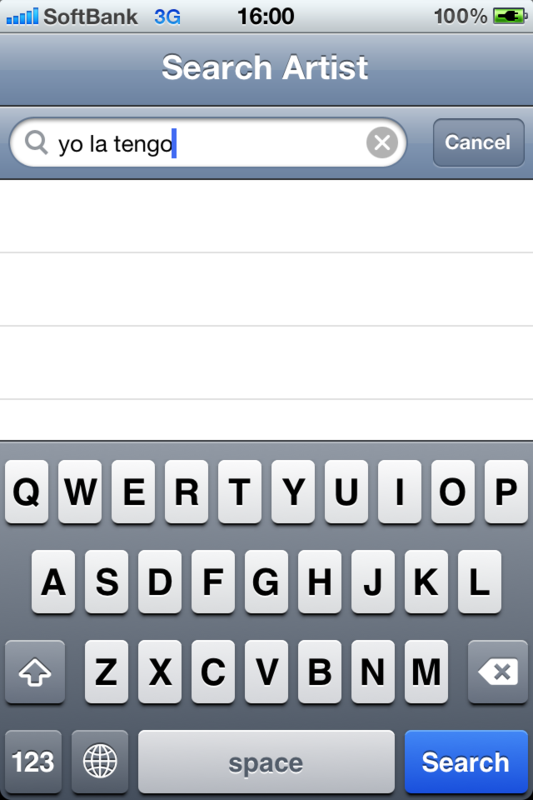
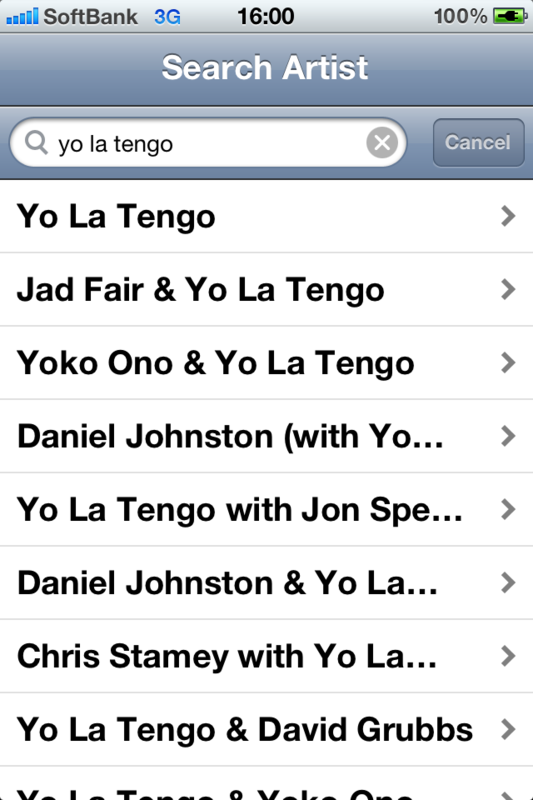
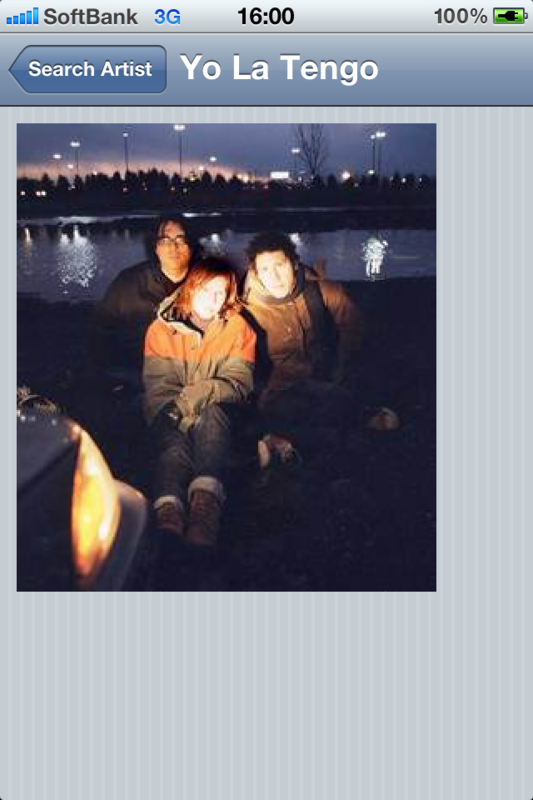
という簡単なデモアプリを作ってみました。
XCodeのテンプレート「Master-Detail Application」をベースに作ってます。
Objective-Cに慣れていないので、この程度の他愛もないことでも結構時間がかかりました。Objective-Cで苦手なのは、メソッド名や定数名がやたら長いものが多いこと。stringByAddingPercentEscapesUsingEncodingとか、何かにつけて長くて、脳の認知資源が無駄に消費されてる気がしました。慣れの問題かもしれませんが。
コード
https://github.com/yolatengo8888/LastFmTest
動作確認環境
※ARCを使ってますので、iOS5以上でないと動きません。
その他
直感的に使えて分かりやすくて便利です。
https://github.com/stig/json-framework/
Instagram Engineering Challengeを解いてみた(3) いろんな画像で試してみる
Instagram Engineering Challenge: The Unshredder - Instagram Engineering
寸断された画像を並び替えて元の画像に戻すという問題。
前回は短冊の幅を自力で推定するようにしました。
他の方の解答をGoogleで探して見ていたところ、Instagram社が提示している画像とは別に独自にshredder画像を作ってる人がいました。
http://www.vinceallen.com/processing/unshred/
https://github.com/timruffles/image-deshredder/tree/gh-pages/img
http://git.zx2c4.com/instagram-unshredder/tree/
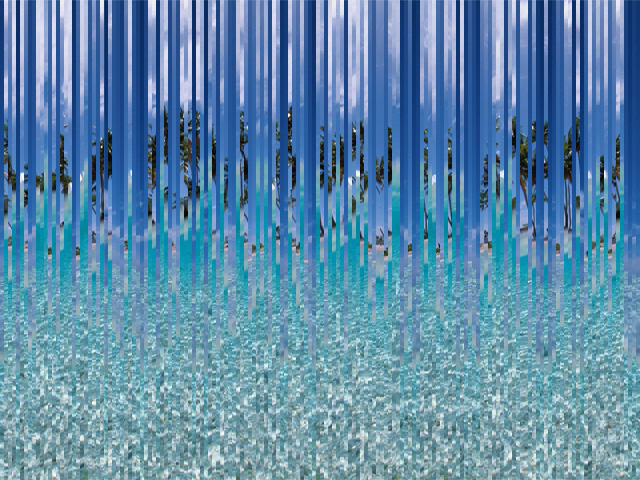
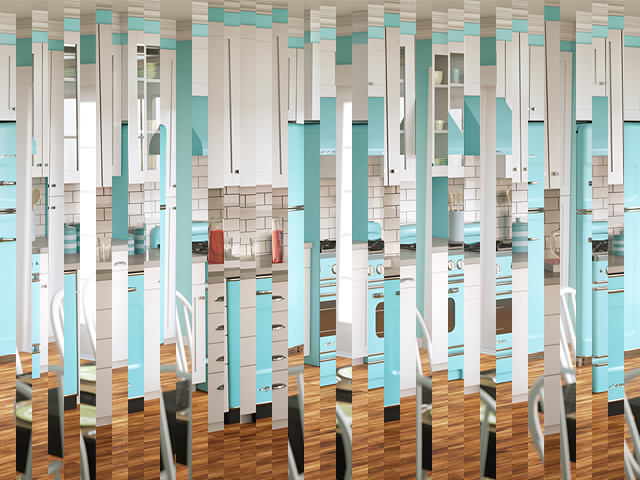
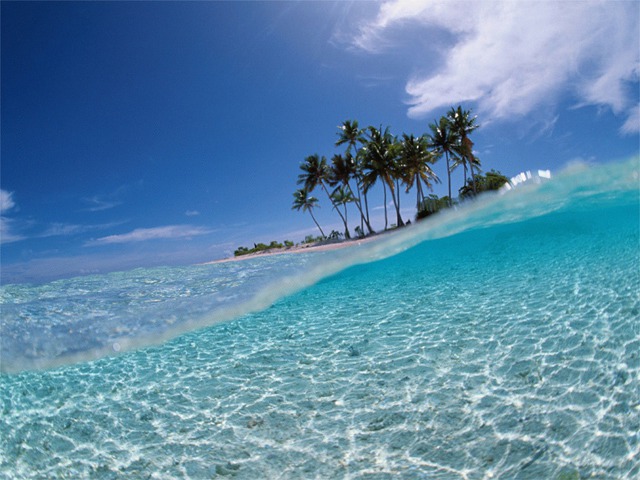
これらの画像で動かしてみたところ、一部うまくソートできない画像がありました。右端候補が複数見つかった場合に正しくソートができていなかったので、その場合も考慮するように修正。全画像できれいにソートできることを確認しました。
変換前
変換後
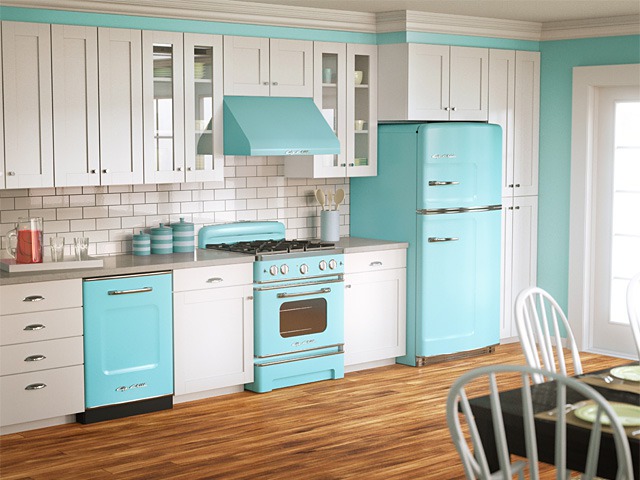
いまひとつエレガントさに欠けるコードですが、ひとまずこのネタは終わり。githubにコードと画像を置いてます。
https://github.com/yolatengo8888/instagram-engineering-challenge--unshredder
動作確認環境
- Ruby 1.9.2
- RMagick 2.13.1
動かし方
$ ruby unshredder.rb 元画像ファイル名
コード
# vim:fileencoding=UTF-8
require "RMagick"
require "rational"

# 画素間の差異を求める
def calc_diff(pixel1, pixel2)
    diff = 0
    diff += (pixel1.red - pixel2.red).abs
    diff += (pixel1.green - pixel2.green).abs
    diff += (pixel1.blue - pixel2.blue).abs
    diff += (pixel1.opacity - pixel2.opacity).abs
    return diff
end

def pixel(image, x, y)
    return image.pixel_color(x, y)
end

# 行間の差異を求める
def calc_diff_columns(image, x1, x2)
    diff = 0
    (0...image.rows).each do |y|
        diff += calc_diff(pixel(image, x1, y), pixel(image, x2, y))
    end
    return diff
end

# 短冊の幅を求める
def detect_strip_width(image, gcdTargetNum = 3)
    diffs = []
    (0...image.columns-1).each do |x|
        diffs.push({"columnIndex" => x + 1,
                          "diff" => calc_diff_columns(image, x, x+1)})
    end

    diffs.sort!{|column1, column2| column1["diff"] <=> column2["diff"]}

    gcdval = diffs[-1]["columnIndex"]
    gcdTargetNum.times do |i|
        gcdval = gcdval.gcd(diffs[-(i+2)]["columnIndex"])
    end
    return gcdval
end

# 短冊(寸断された画像の一片)を表すクラス
class Strip
  def initialize(srcImage, left, right)
      @srcImage = srcImage
      @left = left
      @right = right
      @estimatedLeftStrips = nil
      @rightStrip = nil
  end
  attr_accessor :left, :right, :estimatedLeftStrips, :rightStrip

  # 自短冊の左端と他短冊の右端の類似度を計算する(値が小さいほど類似度高)
  private
  def calc_similarity(other)
      return calc_diff_columns(@srcImage, @left, other.right)
  end

  # 自短冊の左端と他短冊の右端を比較し、類似度が高いものを左側の短冊候補とする
  public
  def estimate_left_strip(strips)
      similarities = []
      strips.each do |other|
          next if other == self
          similarities.push({"strip" => other,
             "degree_of_similarity" => calc_similarity(other)})
      end
      @estimatedLeftStrips = similarities.sort{|item1, item2|
          item1["degree_of_similarity"] <=>
          item2["degree_of_similarity"]}
  end

  # 自短冊の右に来る短冊を探す
  public
  def find_right_strip(strips, rank = 0)
      candidate = []
      strips.each do |other|
          if other.estimatedLeftStrips[rank]["strip"] == self
              candidate.push(other)
          end
      end

      return nil if candidate.empty?

      # 候補が複数ある場合、最も類似度が高いものを採用する
      return candidate.min{|item1, item2|
          item1.estimatedLeftStrips[rank]["degree_of_similarity"] <=>
          item2.estimatedLeftStrips[rank]["degree_of_similarity"]}
  end
end

# 短冊インスタンスの作成
def create_strips(srcImage, stripWidth, numOfStrips)
    strips = []
    (0...numOfStrips).each do |i|
        stripLeft = i * stripWidth
        stripRight = (i + 1) * stripWidth - 1
        strips[i] = Strip.new(srcImage, stripLeft, stripRight)
    end

    strips.each do |strip|
        strip.estimate_left_strip(strips)
    end

    return strips
end

# 各短冊の右に来る短冊を求める
def detect_right_strip(strips, rank = 0, targets = nil)
    return if rank > 2

    rightest = []
    targets ||= strips
    targets.each do |strip|
        strip.rightStrip = strip.find_right_strip(strips, rank)
        rightest.push(strip) if strip.rightStrip == nil
    end

    # 右端と判定された短冊が複数あった場合は類似度を下げてさらに探す
    detect_right_strip(strips, rank + 1, rightest) if rightest.length > 1
end

# 短冊をソートする
def sort(strips)
    sorted = []

    detect_right_strip(strips)

    strips.each do |strip|
        next if sorted.include?(strip)

        tmpArray = [strip]
        loop do
            rightStrip = strip.rightStrip

            if rightStrip == nil || tmpArray.include?(rightStrip)
                sorted.push(tmpArray).flatten!
                break
            end
            if sorted[0] == rightStrip
                sorted.insert(0, tmpArray).flatten!
                break
            else
                tmpArray.push(rightStrip)
                strip = rightStrip
            end
        end
    end

    return sorted
end

# ファイル名の入力を確認する
def parameter_valid?
    if ARGV.empty?
        printf("input shredded image file name.\n")
        exit
    end

    if !File.exist?(ARGV[0])
        printf("%s is not exist.\n", ARGV[0])
        exit
    end
end

# ソート後の画像を作成する
def create_unshredded_image(strips, stripWidth, srcImage, dstFilename)
    dstImage = Magick::Image.new(srcImage.columns, srcImage.rows)
    strips.each_with_index do |strip, i|
        (strip.left..strip.right).each_with_index do |srcx, dstx|
            (0...srcImage.rows).each do |y|
                dstImage.pixel_color(i * stripWidth + dstx, y,
                    srcImage.pixel_color(srcx, y))
            end
        end
    end

    dstImage.write(dstFilename)
end

# main
parameter_valid?

filename = ARGV[0]
srcImage = Magick::ImageList.new(filename)

stripWidth = detect_strip_width(srcImage)
numOfStrips = srcImage.columns / stripWidth
printf("detect strip width = %d\n", stripWidth)
printf("detect number of strips = %d\n", numOfStrips)

strips = create_strips(srcImage, stripWidth, numOfStrips)
sortedStrips = sort(strips)

dstFilename = File.basename(filename, ".*") + "_unshredded" + File.extname(filename)
create_unshredded_image(sortedStrips, stripWidth, srcImage, dstFilename)
Instagram Engineering Challengeを解いてみた(2) 短冊の幅を自力で求める
Instagram Engineering Challenge: The Unshredder - Instagram Engineering
寸断された画像を並び替えて元の画像に戻すという問題。
前回は短冊の幅は既知のものとして解きました。
今回は以下の記事を参考にして短冊の幅を推定するようにしてみました。
http://www.foldifoldi.com/?p=800
元ネタとは少し異なりますが、推定方法は以下の通り。
・各行毎に右隣接行との画素値の差異を求め、配列に格納し、差異値の昇順でソートする
・配列の後方にエッジ行が集まるはずなので、後方の数行の行番号(ソート前)の最大公約数が短冊の幅になるはず
後方から何行までを対象にするかで期待する値が取れない場合があります。もっと良い方法があるかもしれません。
・対象とする行数が少ないと、情報不足で期待する値が取得できない
・対象とする行数が多いと、エッジでない行も混じってしまい、期待する値が取得できない
整列前

整列後

コードはRuby1.9.2、画像の読み書きはRMagickを使ってます。
追記:
Instagram社が提示している画像とは別に独自にshredder画像を作ってる人がいました。これらの画像で動かしてみたところ、「kitchen16.jpg」が正しくソートされないので、バグってるみたいです。週末直します。。
http://www.vinceallen.com/processing/unshred/data/
require "RMagick"
require "rational"

# 画素間の差異を求める
def calc_diff(pixel1, pixel2)
    diff = 0
    diff += (pixel1.red - pixel2.red).abs
    diff += (pixel1.green - pixel2.green).abs
    diff += (pixel1.blue - pixel2.blue).abs
    diff += (pixel1.opacity - pixel2.opacity).abs
    return diff
end

def pixel(image, x, y)
    return image.pixel_color(x, y)
end

# 行間の差異を求める
def calc_diff_columns(image, x1, x2)
    diff = 0
    (0...image.rows).each do |y|
        diff += calc_diff(pixel(image, x1, y), pixel(image, x2, y))
    end
    return diff
end

# 短冊の幅を求める
def detect_strip_width(image, gcdTargetNum = 3)
    diffs = []
    (0...image.columns-1).each do |x|
        diffs.push({"columnIndex" => x + 1,
                          "diff" => calc_diff_columns(image, x, x+1)})
    end

    diffs.sort!{|column1, column2| column1["diff"] <=> column2["diff"]}

    gcdval = diffs[-1]["columnIndex"]
    gcdTargetNum.times do |i|
        gcdval = gcdval.gcd(diffs[-(i+2)]["columnIndex"])
    end
    return gcdval
end

# 短冊(寸断された画像の一片)を表すクラス
class Strip
  def initialize(srcImage, left, right)
      @srcImage = srcImage
      @left = left
      @right = right
      @estimatedLeftStrip = nil
  end
  attr_accessor :left, :right, :estimatedLeftStrip

  # 自短冊の左端と他短冊の右端の類似度を計算する(値が小さいほど類似度高)
  private
  def calc_similarity(other)
      return calc_diff_columns(@srcImage, @left, other.right)
  end

  # 自短冊の左端と他短冊の右端を比較し、類似度が高いものを左側の短冊候補とする
  public
  def estimate_left_strip(strips)
      similarities = []
      strips.each do |other|
          next if other == self
          similarities.push({"strip" => other,
             "degree_of_similarity" => calc_similarity(other)})
      end
      @estimatedLeftStrip = similarities.min{|item1, item2|
          item1["degree_of_similarity"] <=>
          item2["degree_of_similarity"]}
  end

  # 自短冊の右に来る短冊を探す
  public
  def find_right_strip(strips)
      candidate = []
      strips.each do |other|
          if other.estimatedLeftStrip["strip"] == self
              candidate.push(other)
          end
      end

      if candidate.empty?
          # 候補なし(右端の短冊)
          return nil
      end

      # 候補が複数ある場合、最も類似度が高いものを採用する
      return candidate.min{|item1, item2|
          item1.estimatedLeftStrip["degree_of_similarity"] <=>
          item2.estimatedLeftStrip["degree_of_similarity"]}
  end
end

# 短冊インスタンスの作成
def create_strips(srcImage, stripWidth, numOfStrips)
    strips = []
    (0...numOfStrips).each do |i|
        stripLeft = i * stripWidth
        stripRight = (i + 1) * stripWidth - 1
        strips[i] = Strip.new(srcImage, stripLeft, stripRight)
    end

    strips.each do |strip|
        strip.estimate_left_strip(strips)
    end

    return strips
end

# 短冊をソート
def sort(strips)
    sorted = []

    strips.each do |strip|
        next if sorted.include?(strip)

        tmpArray = [strip]
        while strip != nil || sorted[0] != strip do
            rightStrip = strip.find_right_strip(strips)
            if rightStrip == nil
                # 右端
                sorted.push(tmpArray).flatten!
                break
            end
            if !sorted.empty? && sorted[0] == rightStrip
                sorted.insert(0, tmpArray).flatten!
                break
            else
                tmpArray.push(rightStrip)
                strip = rightStrip
            end
        end
    end

    return sorted
end

# main
srcImage = Magick::ImageList.new("TokyoPanoramaShredded.png")

stripWidth = detect_strip_width(srcImage)
numOfStrips = srcImage.columns / stripWidth
printf("detect strip width = %d\n", stripWidth)

strips = create_strips(srcImage, stripWidth, numOfStrips)
sortedStrips = sort(strips)

# ソート後の短冊から画像を作成する
dstImage = Magick::Image.new(srcImage.columns, srcImage.rows)
sortedStrips.each_with_index do |strip, i|
    (strip.left..strip.right).each_with_index do |srcx, dstx|
        (0...srcImage.rows).each do |y|
            dstImage.pixel_color(i * stripWidth + dstx, y,
                srcImage.pixel_color(srcx, y))
        end
    end
end

dstImage.write("TokyoPanoramaShredded_sorted.png")
Instagram Engineering Challengeを解いてみた
Instagram Engineering Challenge: The Unshredder - Instagram Engineering
以下のように寸断された画像を並び替えて元の画像に戻すという問題。
整列前
整列後
Rubyの勉強がてらにやってみました。
画像の分割数を自力で求めるとボーナスがつきますが、今回はとりあえず自明な値(20)としました。
Rubyのバージョンは1.9.2、画像の読み書きはRMagickを使ってます。
普段はJavaかC++で、Rubyは馴染みがないです。
まともなコードになってるか不安です。
require 'RMagick'

# 短冊(寸断された画像の一片)を表すクラス
class Strip
  def initialize(srcImage, left, right)
      @srcImage = srcImage
      @left = left
      @right = right
      @estimatedLeftStrip = nil
  end
  attr_accessor :left, :right, :estimatedLeftStrip

  private
  def pixelL(y)
      return @srcImage.pixel_color(@left, y)
  end

  public
  def pixelR(y)
      return @srcImage.pixel_color(@right, y)
  end

  private
  def calc_diff(pixel1, pixel2)
      diff = 0
      diff += (pixel1.red - pixel2.red).abs
      diff += (pixel1.green - pixel2.green).abs
      diff += (pixel1.blue - pixel2.blue).abs
      diff += (pixel1.opacity - pixel2.opacity).abs
  end

  # 自短冊の左端と他短冊の右端の類似度を計算する(値が小さいほど類似度高)
  private
  def calc_similarity(other)
      diff = 0
      (0...@srcImage.rows).each do |y|
          diff += calc_diff(pixelL(y), other.pixelR(y))
      end
      return diff
  end

  # 自短冊の左端と他短冊の右端を比較し、類似度が高いものを左側の短冊候補とする
  public
  def estimate_left_strip(strips)
      similarities = []
      strips.each do |other|
          next if other == self
          similarities.push({"strip" => other,
             "degree_of_similarity" => calc_similarity(other)})
      end
      @estimatedLeftStrip = similarities.min{|item1, item2|
          item1["degree_of_similarity"] <=>
          item2["degree_of_similarity"]}
  end

  # 自短冊の右に来る短冊を探す
  public
  def find_right_strip(strips)
      candidate = []
      strips.each do |other|
          if other.estimatedLeftStrip["strip"] == self
              candidate.push(other)
          end
      end

      if candidate.empty?
          # 候補なし(右端の短冊)
          return nil
      end

      # 候補が複数ある場合、最も類似度が高いものを採用する
      return candidate.min{|item1, item2|
          item1.estimatedLeftStrip["degree_of_similarity"] <=>
          item2.estimatedLeftStrip["degree_of_similarity"]}
  end
end

# 短冊インスタンスの作成
def create_strips(srcImage, stripWidth, numOfStrips)
    strips = []
    (0...numOfStrips).each do |i|
        stripLeft = i * stripWidth
        stripRight = (i + 1) * stripWidth - 1
        strips[i] = Strip.new(srcImage, stripLeft, stripRight)
    end

    strips.each do |strip|
        strip.estimate_left_strip(strips)
    end

    return strips
end

# 短冊をソート
def sort(strips)
    sorted = []

    strips.each do |strip|
        next if sorted.include?(strip)

        tmpArray = [strip]
        while strip != nil || sorted[0] != strip do
            rightStrip = strip.find_right_strip(strips)
            if rightStrip == nil
                # 右端
                sorted.push(tmpArray).flatten!
                break
            end
            if !sorted.empty? && sorted[0] == rightStrip
                sorted.insert(0, tmpArray).flatten!
                break
            else
                tmpArray.push(rightStrip)
                strip = rightStrip
            end
        end
    end

    return sorted
end

# main
NUM_OF_STRIPS = 20
srcImage = Magick::ImageList.new("TokyoPanoramaShredded.png")
stripWidth = srcImage.columns / NUM_OF_STRIPS
strips = create_strips(srcImage, stripWidth, NUM_OF_STRIPS)
sortedStrips = sort(strips)

# 整列後の短冊から画像を作成する
dstImage = Magick::Image.new(srcImage.columns, srcImage.rows)
sortedStrips.each_with_index do |strip, i|
    (strip.left..strip.right).each_with_index do |srcx, dstx|
        (0...srcImage.rows).each do |y|
            dstImage.pixel_color(i * stripWidth + dstx, y,
                srcImage.pixel_color(srcx, y))
        end
    end
end

dstImage.write("TokyoPanoramaShredded_sorted.png")
